
Reliability looks simple on a slide.
“Keep it up.” “Recover fast.” “No downtime.”
In the real world, every reliability decision collides with another goal. Security wants fewer moving parts. Cost wants less redundancy. Ops wants simplicity. Performance wants the shortest path.
The Azure Well-Architected Framework (WAF) is the best lens I know for making those collisions visible, measurable, and intentional.
Quick definitions (the terms that keep teams honest)
- SLO (Service Level Objective): the reliability target you commit to internally for a user flow (example: 99.9% successful checkout requests).
- SLI (Service Level Indicator): the metric that proves whether you are meeting the SLO (example: success rate, latency, error budget burn).
- SLA (Service Level Agreement): the external contract promise and the consequences if you miss it.
- RTO (Recovery Time Objective): how long you can be down before the business impact becomes unacceptable.
- RPO (Recovery Point Objective): how much data loss (time window) you can tolerate.
- MTTR (Mean Time to Recover): how quickly you actually recover in practice, on average.
- Blast radius: how far a failure spreads when something breaks.
The WAF Reliability lens
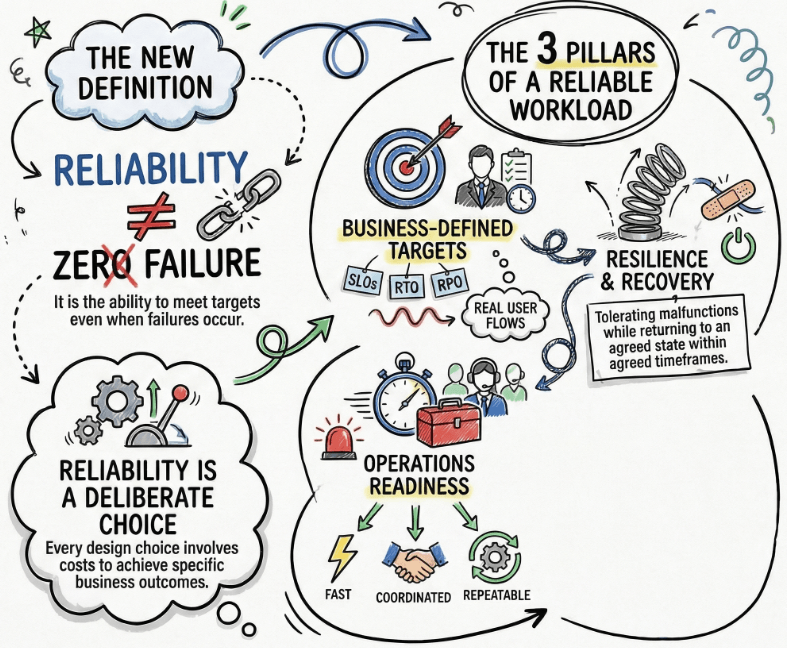
In WAF, a “reliable workload” is not a workload that never fails.
It is a workload that consistently meets its reliability and recovery targets, even when failures happen.
That implies four things that show up repeatedly in WAF Reliability guidance:
- Business-defined targets (SLOs, RTO, RPO) that match real user flows.
- Resilience so the workload can tolerate malfunctions and keep operating, even if it degrades.
- Recovery so the workload can return to an agreed state within an agreed time.
- Operations readiness so detection and incident response are fast, coordinated, and repeatable.
If you take nothing else from this article, take this:
Reliability is a set of deliberate design and operations choices. Every choice has a cost.The WAF pillars help you pay the right costs for the right outcomes.
Architecting Resilience Reliability Lens
Trade-offs across the WAF pillars
Reliability vs Security
Security wants a contained surface area and controls that stay active under stress. Reliability often pushes you toward duplication, extra pathways, and “break glass” access.
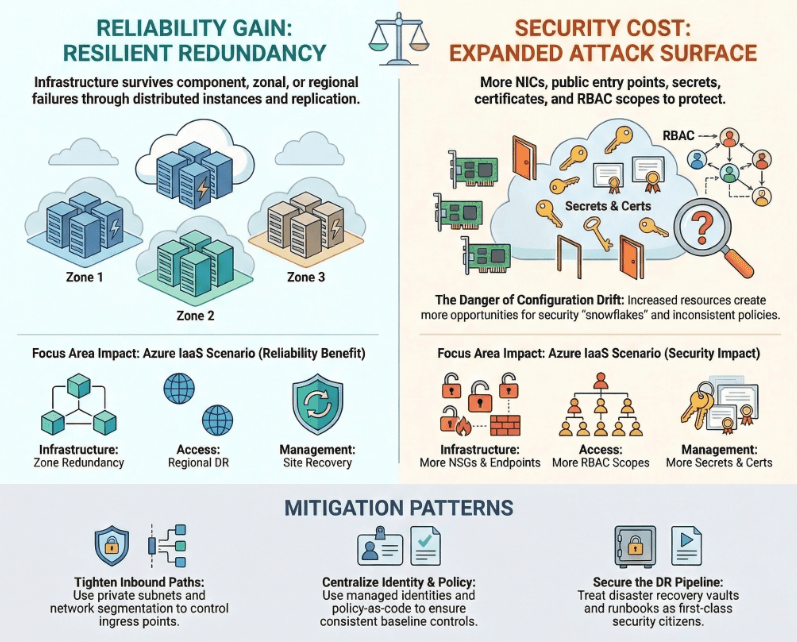
Trade-off 1: Increased workload surface area
What you gain (Reliability): redundancy that survives component, zonal, or regional failures.
What you pay (Security): more resources, endpoints, identities, policies, and configurations to protect.
Azure IaaS scenario: You run a customer portal on a VM Scale Set behind Application Gateway. To hit your availability targets, you distribute instances across Availability Zones, add a second gateway for zone redundancy, replicate data, and add Azure Site Recovery for regional DR.
Reliability gets better, but your attack surface expands:
- More NICs, NSGs, public entry points, and private endpoints.
- More secrets and certificates.
- More RBAC scopes and deployment identities.
- More configuration drift opportunities.
Mitigation patterns (WAF aligned):
- Use network segmentation and tight inbound paths (private subnets, controlled ingress).
- Keep identity centralized and auditable (managed identities where possible).
- Apply policy-as-code and baseline controls so replication does not mean “snowflake security.”
- Treat DR components as first-class security citizens (vaults, replication targets, runbooks).
Trade-off 2: Security control bypass pressure during incident response
What you gain (Reliability): faster recovery when the clock is ticking.
What you pay (Security): the temptation to bypass controls and forget to re-enable them.
Azure IaaS scenario: An outage hits at 2:00 AM. Users cannot log in. The fastest path looks like:
- Open the firewall wider.
- Temporarily disable conditional access.
- Grant broad owner rights to “just fix it.”
That can restore service, but it can also create a second incident: a security exposure.
Mitigation patterns (WAF aligned):
- Predefine break-glass procedures with time-bound access and auditing.
- Use privileged access workflows (approval, just-in-time access where available).
- Automate rollback steps in the incident runbook.
- Practice this in drills so the team is not improvising under stress.
Trade-off 3: Old software versions vs patching downtime risk
What you gain (Reliability): fewer change-induced outages.
What you pay (Security): increased exposure from unpatched systems and outdated dependencies.
Azure IaaS scenario: You have SQL Server on Azure VMs and a set of application VMs. Patching feels risky because “last time it broke something.” So patching gets delayed.
That decision can reduce short-term unplanned downtime, but it increases long-term risk and incident probability.
Mitigation patterns (WAF aligned):
- Design patching as a reliability feature: rolling updates, maintenance windows, and pre-prod validation.
- Use redundancy to patch without full downtime (multiple instances, load balancer draining, phased updates).
- Standardize images and automate deployment so patching is repeatable.
Short story I see often: A team invests heavily in zone redundancy and DR, but leaves patching manual. Six months later a vulnerable library becomes the source of an outage through exploitation. The architecture was “resilient,” but the operational discipline was not.
Reliability vs Cost Optimization
Cost optimization is not “spend as little as possible.” In WAF, it is about maximizing value and reducing waste. Reliability can look like waste: extra instances, extra region, extra tools, extra people.
Trade-off 1: Increased implementation redundancy or “waste”
What you gain (Reliability): tolerance for concurrent failures and safer deployments.
What you pay (Cost): higher steady-state and transient spend.
Azure IaaS scenario: You deploy a VM Scale Set with enough instances to survive the loss of a zone during peak traffic. You also use a blue-green strategy for the application tier to reduce deployment risk.
That means:
- Extra instances most days.
- Twice the compute during deployments.
- More replication and storage.
Mitigation patterns (WAF aligned):
- Size redundancy based on critical user flows and their SLOs, not on gut feel.
- Use autoscale where it is safe, but keep headroom for failover lag.
- Time-box higher spend during releases (deploy less frequently if you must, but deploy safely).
- Match DR investment to your actual RTO/RPO instead of “maximum everything.”
Trade-off 2: Increased operations investment that is not a functional requirement
What you gain (Reliability): faster detection, triage, and recovery.
What you pay (Cost): telemetry ingestion, tooling, drills, on-call rotation, and support contracts.
Azure IaaS scenario: To hit a strict MTTR target, you build:
- Azure Monitor alerts on key SLIs.
- Centralized logs in Log Analytics.
- Dashboards for business-critical flows.
- An on-call rotation with clear escalation.
None of that ships a “new feature,” but it reduces outage duration and protects revenue.
Mitigation patterns (WAF aligned):
- Start with high signal telemetry tied to user flows, not “collect everything.”
- Set retention and sampling intentionally to manage log costs.
- Run DR drills quarterly, not annually.
- Right-size support contracts to the workload criticality.
Short story I see often: A team saves money by reducing monitoring and skipping drills. Then a failover event happens. The architecture survives, but the team burns hours figuring out what state they are in. The outage cost dwarfs the “savings.”

Reliability vs Operational Excellence
Operational Excellence and Reliability both value repeatability and learning, but reliability patterns often add components and coordination. Complexity is the hidden tax.
Trade-off 1: Increased operational complexity
What you gain (Reliability): fault isolation, safe failover, and survivability.
What you pay (Ops): more moving parts to deploy, monitor, and troubleshoot.
Azure IaaS scenario: You add Azure Service Bus between web and processing tiers to decouple spikes and protect downstream systems. Reliability improves because retries and buffering prevent cascading failures.
But operations become more complex:
- More telemetry sources.
- More failure modes (queue backlog, dead-lettering, poison messages).
- More runbooks and dependencies.
Mitigation patterns (WAF aligned):
- Keep patterns consistent and standardized.
- Build a “health model” that defines what normal looks like for each component.
- Invest in distributed tracing and correlation where possible.
- Limit the blast radius with isolation boundaries and clear ownership.
Trade-off 2: Increased effort to generate team knowledge and awareness
What you gain (Reliability): a system that behaves predictably under failure.
What you pay (Ops): onboarding time, documentation work, and training.
Azure IaaS scenario: You run active-active in two regions because the business cannot tolerate a regional outage. Now the team must understand:
- Cross-region data replication behavior.
- Failover and failback procedures.
- DNS and traffic routing behavior.
- Operational differences between regions and quotas.
Mitigation patterns (WAF aligned):
- Keep living documentation: topology, dependencies, runbooks, and decision logs.
- Run game days so the newest engineer learns in controlled conditions.
- Use automation for deployment and configuration drift checks.
Short story I see often: A team builds a strong architecture, but tribal knowledge lives in one person’s head. The first time that person is unavailable during an incident, MTTR spikes. Reliability is not just architecture. It is shared operational capability.

Reliability vs Performance Efficiency
Performance Efficiency wants speed and right-sized resources. Reliability often adds hops, replication, and headroom. That can raise latency and reduce utilization.
Trade-off 1: Increased latency
What you gain (Reliability): survivability through replication and distribution.
What you pay (Performance): slower writes, longer network paths, and instrumentation overhead.
Azure IaaS scenario: You run SQL Server Always On availability groups across zones for HA. Writes may wait for replication or commit behavior depending on configuration. You also add health probes, retries, and more telemetry.
The user experience can suffer if you do not budget for that overhead.
Mitigation patterns (WAF aligned):
- Be explicit about which flows need strict consistency and which can tolerate eventual consistency.
- Keep chatty calls within the same zone when possible.
- Cache safely for read-heavy flows.
- Measure the SLI impact of instrumentation and tune.
Trade-off 2: Increased over-provisioning
What you gain (Reliability): burst absorption and protection during scaling or failover lag.
What you pay (Performance Efficiency): lower utilization and higher spend.
Azure IaaS scenario: Autoscale cannot instantly create new VM instances. If you expect sudden spikes (legit traffic, not just attacks), you keep warm capacity. That looks inefficient on a utilization chart, but it prevents overload and timeouts.
Mitigation patterns (WAF aligned):
- Use load tests to quantify how much headroom you actually need.
- Combine over-provisioning with load shaping (queues, backpressure) to reduce how much buffer you need.
- Use separate scaling profiles for normal vs failover conditions.
Short story I see often: Teams optimize utilization so hard that they remove all headroom. The system looks “efficient,” right up until a zone failure or deployment hiccup hits. Then the surviving instances saturate, and you get a cascading outage. In WAF terms, you optimized performance efficiency past the point where reliability could be achieved.

A practical Azure IaaS reference scenario (end-to-end)
Let’s make this concrete with a single, cohesive Azure IaaS-heavy example.
The workload
A B2B customer portal with three tiers:
- Web tier: VM Scale Set across Availability Zones.
- App tier: VM Scale Set across zones.
- Data tier: SQL Server on Azure VMs using Always On availability groups (HA within a region).
Supporting components:
- Ingress: Application Gateway v2 with WAF enabled.
- Decoupling: Azure Service Bus for background jobs and spike protection.
- Storage: a deliberate redundancy choice for file artifacts (chosen based on RPO/RTO and cost).
- DR: Azure Site Recovery for regional disaster recovery of critical VMs plus Azure Backup for recovery points.
- Observability: Azure Monitor metrics, logs in Log Analytics, alerts for key SLIs and dependencies.
This setup is intentionally “WAF flavored.” It forces you to confront trade-offs across the pillars.

Failure event 1: Zonal impairment during peak usage
A zonal issue increases failures and latency for a subset of VM instances.
What happens next depends on your WAF-informed choices:
- If your VM Scale Sets are zone-spanning with enough instances, you can absorb the loss of capacity.
- If you sized for average load only, surviving instances saturate and the blast radius grows.
- If your security controls are too brittle, incident response may push people toward dangerous shortcuts.
The winning pattern is boring:
- Pre-sized headroom for failover.
- Health probes and load balancing that quickly route away from unhealthy instances.
- Alerts that fire on user-flow SLIs, not just CPU.
- Runbooks that are practiced.
Failure event 2: Bad deployment and configuration drift
A new application build ships with a misconfiguration that increases errors.
Here is where “safe deployment” and “trade-offs” become real:
- Blue-green reduces risk but increases cost during the cutover window.
- More granular firewall rules reduce blast radius but can increase misconfiguration risk.
- Faster rollback is great for reliability, but you need to preserve security controls while you do it.
The winning pattern again is deliberate:
- Automated validation gates.
- A rollback path that is tested.
- A change strategy that matches criticality.
- Post-incident learning that updates the checklist and runbooks.
WAF is not asking you to be perfect. It is asking you to be intentional, measured, and repeatable.
Decision Cheatsheet (If you choose X, plan for Y)
- If you choose zone redundancy, plan for more components to secure and more operational monitoring.
- If you choose multi-region DR, plan for replication design, failover runbooks, and regular drills.
- If you choose blue-green deployments, plan for temporary duplicate spend and clean rollback automation.
- If you choose tight RBAC and narrow firewall rules, plan for automation and testing to avoid misconfigurations.
- If you choose queues for decoupling, plan for queue health SLIs, dead-letter handling, and ownership.
- If you choose heavy observability, plan for log cost management and signal-first dashboards.
- If you choose maximum utilization, plan for reliability risk during spikes and failovers.
- If you choose over-provisioning headroom, plan for budget justification tied to SLOs and MTTR.
Reliability review mini-checklist (WAF aligned)
Use these as design review questions before you scale a workload or commit to an SLA.
- What are our SLOs for the top 3 user flows, and what are the SLIs?
- What are the negotiated RTO and RPO, and are they documented and agreed?
- What are the top failure modes (compute, network, identity, data corruption, dependency outage) and the expected blast radius?
- Where do we have single points of failure, and are they acceptable given the targets?
- Are we using redundancy in layers (compute, network, data, operations), especially for critical flows?
- How does the system degrade gracefully when a noncritical component fails?
- Do we have a scaling strategy that is timely enough for our demand patterns, including failover conditions?
- What is our patching approach, and can we patch without a full outage?
- Do we have structured, tested, documented DR plans for the whole system, not just one component?
- When did we last run a failover drill and a restore test, and what did we change afterward?
- What are the health signals we rely on, and do we alert on user-impact first?
- In an incident, how do we avoid bypassing security controls, and what are the break-glass steps?
- How will we onboard a new engineer so they can respond effectively during an incident?
- What is the cost of our reliability posture, and is it aligned to the business value of the workload?
- What is our feedback loop for post-incident learning so the system improves every month?
The Wrap Up
If you design in Azure long enough, you learn that reliability is never “on” or “off.”
It is a set of trade-offs you make in the open, grounded in targets, failure modes, and operational reality.
If you want, drop a comment with your workload type (IaaS, PaaS, hybrid) and the reliability trade-off you are wrestling with right now.