
A secure Azure workload is not “more tools.” It is design decisions that make attacks expensive, contain blast radius when something breaks, and let you detect and recover fast.
In this article, I break down the Azure Well-Architected Framework (WAF) Security pillar design principles into practical architecture moves you can apply in Azure IaaS and hybrid environments. I use consistent, real-world scenarios (three-tier VM app, hub-spoke, and hybrid admin plane) to show how Zero Trust and the CIA triad (confidentiality, integrity, availability) translate into identity, network, data, and operations controls you can actually implement. You will also see the tradeoffs, especially where security and reliability pull in opposite directions, and how to reduce friction without lowering your security bar.
1. WAF Security mindset: Zero Trust + CIA triad
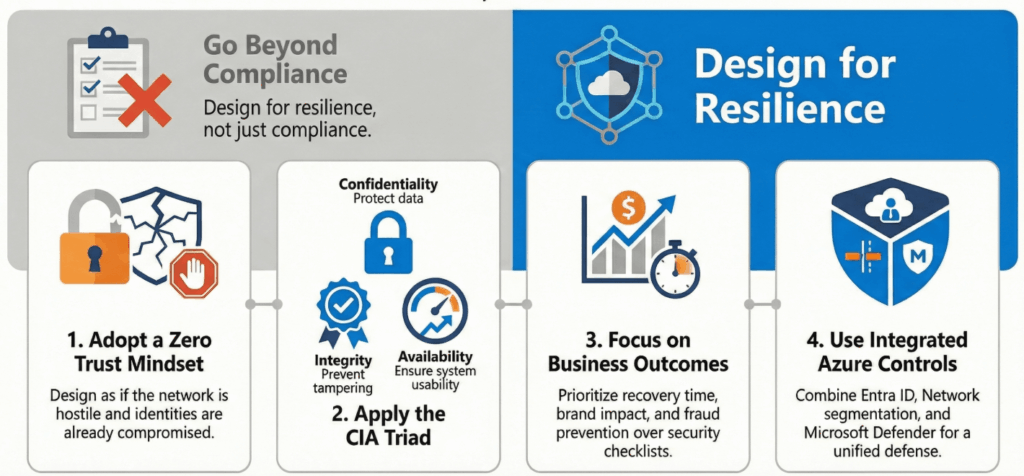
A Well-Architected workload is built with a Zero Trust approach and engineered around the CIA triad. In WAF Security, the question is not “Are we compliant?” It is “Are we resilient to attack and operationally ready when something goes wrong?”
What this means in Azure
- Zero Trust means you design as if the network is hostile, identities can be compromised, and controls can fail.
- CIA means you protect data from exposure (C), prevent tampering (I), and keep the system usable (A), even during incidents.
- WAF Security keeps pulling you back to business outcomes: brand impact, downtime, fraud, regulatory exposure, and recovery time.
IaaS scenario
- Three-tier VM app in a spoke VNet (web, app, data tier) behind an Application Gateway or load balancer.
- Hub-spoke network with Azure Firewall in the hub, UDRs, NSGs, and forced tunneling.
- Hybrid connectivity via VPN/ExpressRoute, with an admin jump box model.
Azure controls to use
- Identity: Entra ID, MFA, Conditional Access, PIM, managed identities
- Network: segmentation with subnets/NSGs, Azure Firewall, Private Link where appropriate, Bastion
- Threat/Posture: Defender for Cloud, Sentinel, Policy, Monitor/Log Analytics
Common failure mode
- Teams treat “security” as a checklist at the end, then discover the real constraints during go-live (identity, routing, logging, ownership).
WAF checkpoint
- Can I clearly explain how this workload applies Zero Trust and the CIA triad, and how each decision maps back to WAF Security?
WAF Security Resilience Mindset
2. The 4 questions that reveal your real security posture
WAF Security starts by asking questions that measure effectiveness, not effort.
Most teams measure security by activity: alerts, dashboards, policies, scanners, ticket counts. WAF Security measures something tougher: effectiveness under pressure. These four questions expose whether your design is actually defensible when an attacker lands inside your environment or when a mistake happens at 2 a.m. They also force clarity on what matters most: what is valuable to an attacker, where the boundaries are, and how fast your team can act with defined ownership. In Azure, I see these questions separate “we have controls” from “we can contain and recover.” If your answers are vague, that is your roadmap.
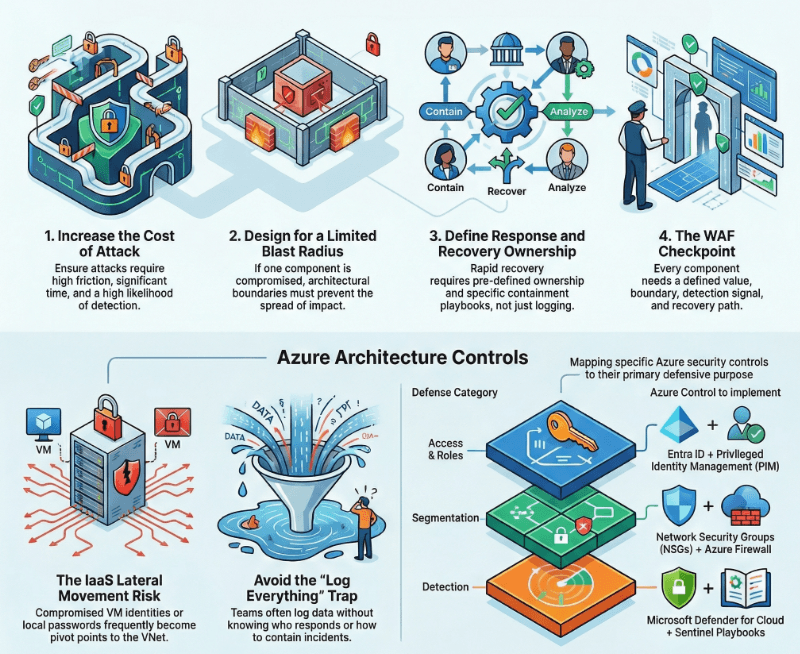
- Are we making attacks costly enough (time, access friction, detection likelihood)?
- If one component is compromised, is blast radius limited by design?
- Do we understand attacker value: credentials, data, compute control, lateral movement?
- Can we detect, respond, and recover quickly with defined ownership?
IaaS scenario
- A compromised VM identity or local admin password becomes a pivot point to the rest of the VNet.
- A mis-scoped role assignment at subscription level becomes a tenant-wide incident.
Azure controls to use
- Access reviews and role assignments: Entra ID + PIM
- Segmentation and egress control: NSGs + Azure Firewall
- Detection and response: Defender for Cloud + Sentinel playbooks (where used)
- Recovery: Backup/ASR strategy with security parity
Common failure mode
- Teams “log everything” but cannot answer who responds, what they do first, and how fast they can contain.
WAF checkpoint
- For each major component, can I state (1) attacker value, (2) containment boundary, (3) detection signal, (4) recovery path?
The 4 areas of security posture
3. Zero Trust compass in Azure: Verify explicitly, Least privilege, Assume breach
WAF Security uses the Microsoft Zero Trust model as a compass. In practice, these three ideas show up in every architecture decision.
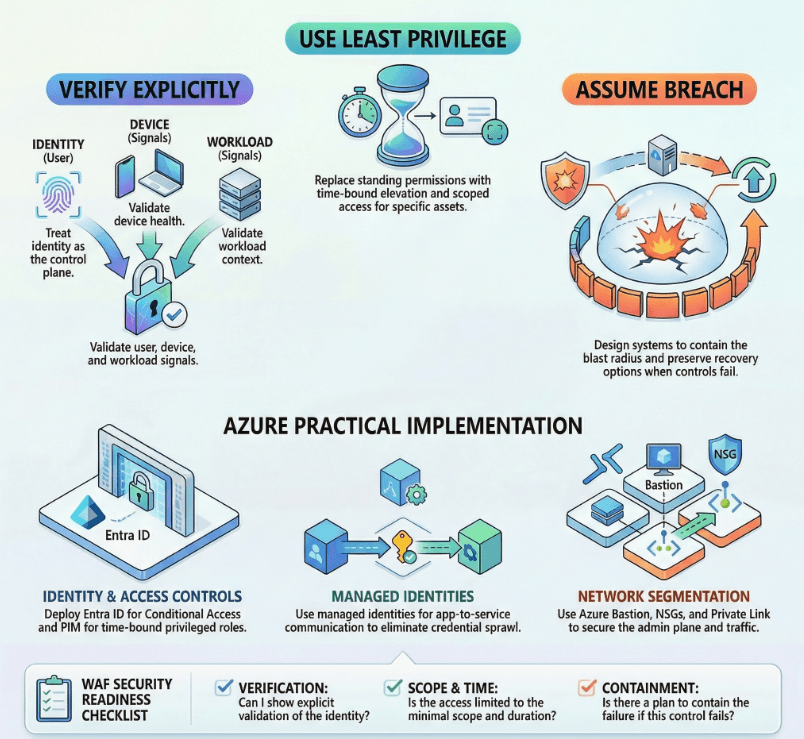
Zero Trust becomes actionable when you treat it as a compass for every design choice. Verify explicitly is how you prevent impersonation from becoming access. Least privilege is how you keep legitimate access from turning into full takeover. Assume breach is how you design the environment so one failure does not become an organization-wide incident. In Azure IaaS and hybrid, these principles show up in identity decisions, admin access paths, segmentation, key management, logging, and recovery design. The goal is not perfection. The goal is engineered containment, fast detection, and reliable recovery, even if one layer fails.
Verify explicitly
- Treat identity as the new control plane.
- Validate signals: user, device, location, workload identity, and resource context.
Use least privilege
- Right identity, right permissions, right duration, right assets.
- Replace standing permissions with time-bound elevation where possible.
Assume breach
- Expect a control to fail and add compensating controls.
- Design to contain blast radius and preserve recovery options.
What this means in Azure
- “Verify explicitly” becomes Conditional Access, strong auth, and workload identity decisions.
- “Least privilege” becomes scoped RBAC, PIM, JIT/JEA patterns, and separation of duties.
- “Assume breach” becomes segmentation, egress control, encryption, logging, and recovery hardening.
IaaS scenario
- Hybrid admin plane: admins access Azure via Bastion or a hardened jump host, no public RDP, and privileged roles are time-bound.
- Three-tier app: app tier uses managed identity to reach Key Vault and data services, not stored credentials.
Azure controls to use
- Entra ID: MFA, Conditional Access, Identity Protection (where applicable), access reviews
- PIM: time-bound elevation for privileged roles
- Managed identities: remove credential sprawl
- Network: Bastion, NSGs, Firewall, Private Link where appropriate
Common failure mode
- “We have MFA” but still allow legacy auth paths, weak conditional policies, or broad contributor roles that turn one compromised account into a full takeover.
WAF checkpoint
- For every privileged action, can I show: explicit verification, minimal scope, minimal time, and a containment plan if it fails?
Azure Zero Trust Compass
4. Plan your security readiness
WAF Security is not just architecture. It is readiness: segmentation decisions, training, incident response, compliance, standards, and SOC alignment.
Security architecture fails when operations are not ready. WAF Security expects you to plan readiness the same way you plan availability: clear responsibilities, repeatable processes, and investments aligned to business priorities. This is where segmentation becomes more than networking. It becomes accountability. Who owns the hub, who owns the spoke, who approves firewall changes, who handles incident triage, and who has authority to contain fast. In Azure environments, lack of readiness shows up as drift, slow incident response, and broad access “just in case.” A solid readiness plan replaces that with ownership, guardrails, and a practiced response path.
What this means in Azure
- Build a security readiness plan that aligns with business priorities and defines ownership.
- Treat segmentation as both a technical boundary and an accountability boundary.
- Incident response must be written, practiced, and integrated with how you actually operate.
IaaS scenario
- Hub-spoke model where the networking team owns hub policies and firewall rules, while the workload team owns spoke NSGs and app deployments.
- Separate “break glass” access and privileged roles for emergency recovery.
Azure controls to use
- Segmentation: subscriptions/management groups, VNets/subnets, NSGs, Firewall policies
- Training: role-based labs for Azure security operations and IaC guardrails
- IR: runbooks, alert routing, on-call ownership, escalation paths
- Compliance: Azure Policy initiatives, Defender for Cloud regulatory compliance dashboards (where used)
Common failure mode
- Segmentation exists only in the network diagram, not in RBAC and ownership. That creates drift and slow response during incidents.
WAF checkpoint
- Do we have clear security boundaries for the environment, the workload, and the team responsibilities, and are they enforced by policy and process?
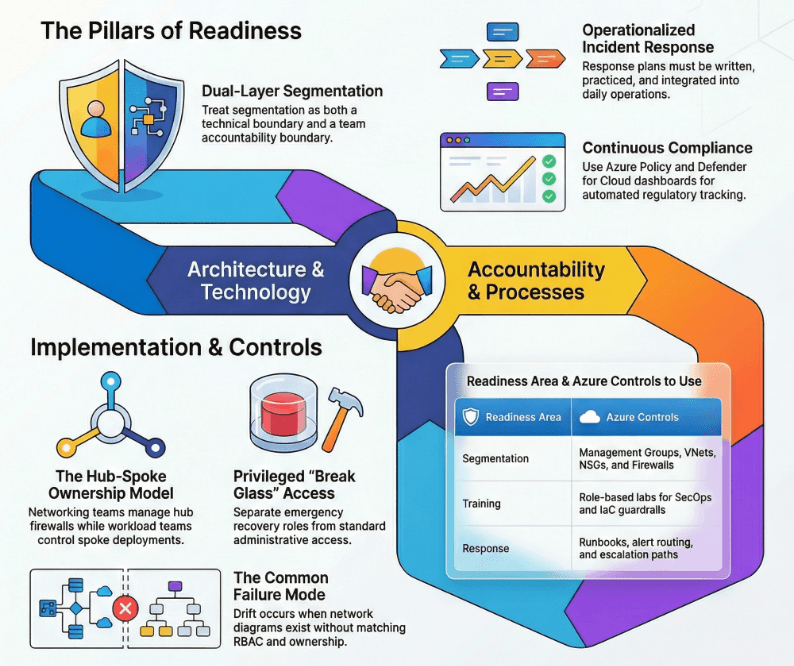
The Pillars of Readiness
5. Design to protect confidentiality
Confidentiality is about preventing exposure of private, regulated, proprietary, or operationally sensitive information. In WAF Security, confidentiality is enforced with access restrictions, opacity, and auditability.
Confidentiality is not just encryption. It is controlling who can access sensitive information, where it is allowed to flow, and how you prove it stayed inside boundaries. WAF Security pushes you to classify data, define trust boundaries, and then enforce those boundaries with identity, network controls, and audit trails. In Azure IaaS and hybrid scenarios, confidentiality failures usually come from predictable places: secrets sprawl, public exposure, overly permissive identities, and unmanaged outbound paths. If you focus only on inbound security, you miss how most real breaches create impact: data leaving. The best confidentiality designs assume someone will get in and still prevent meaningful exposure.
What this means in Azure
- Classify data and map it to trust boundaries.
- Protect data at rest, in transit, and during processing.
- Design for exfiltration resistance: control egress, reduce secret sprawl, log access.
IaaS scenario
- Three-tier VM app where the data tier contains customer PII. App tier calls the database via private IPs only, no public endpoints.
- Admins access sensitive systems through a controlled path with full auditing.
Azure controls to use
- Access: Entra ID, Conditional Access, scoped RBAC, managed identities
- Data classification and controls: Purview where applicable, tagging/metadata, policy initiatives
- Encryption: TLS in transit, encryption at rest (platform-managed keys by default, consider CMK where required), Key Vault for keys/secrets
- Exfiltration controls: Firewall egress rules, Private Endpoints, restrict outbound to required destinations, consider DLP patterns for data movement
- Audit trail: Azure Monitor + Log Analytics, resource logs where available, Key Vault logging
Common failure mode
- Teams secure inbound traffic but ignore outbound. Many real breaches are data leaving, not traffic coming in.
WAF checkpoint
- Can I show that sensitive data is classified, access is least-privilege, encryption is enforced, egress is controlled, and access is logged end-to-end?
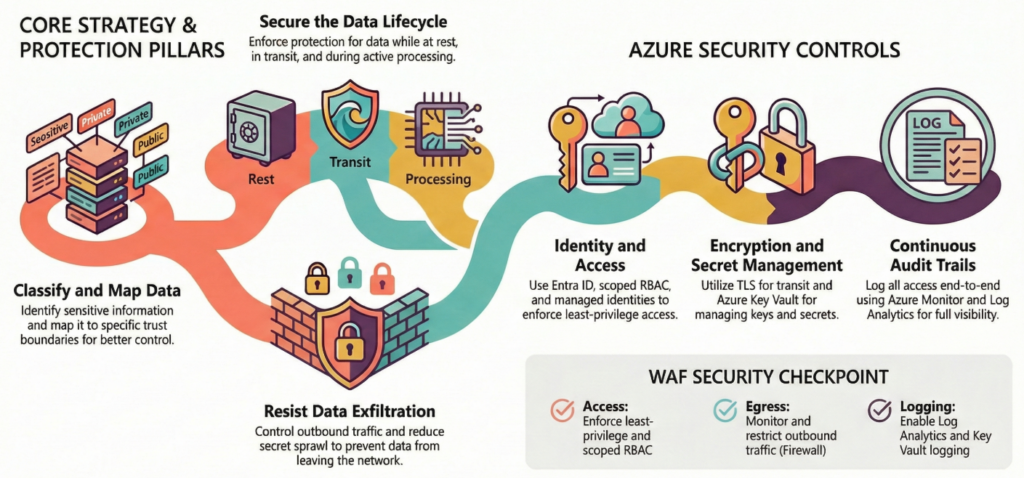
Protect Confidentiality
6. Design to protect integrity
Integrity prevents corruption of code, configurations, deployments, data, and even lower-level components. In WAF Security, weak integrity controls usually turn into bigger confidentiality and availability problems later.
Integrity is what keeps your environment trustworthy. If an attacker can tamper with code, infrastructure, routes, images, or backups, you lose predictability. That is when small incidents turn into long outages, silent data corruption, or persistent footholds. WAF Security treats integrity as end-to-end: change control, access control, supply chain validation, and recovery data you can actually trust. In Azure IaaS, integrity problems often start with convenience: broad Contributor roles, unmanaged image pipelines, and ungoverned changes to networking and identity. The goal is simple: make unauthorized change hard, make authorized change auditable, and make rollback possible.
What this means in Azure
- Prevent unauthorized modification of infrastructure and data.
- Reduce supply-chain risk across build, deploy, and runtime.
- Ensure backups and recovery data are trustworthy.
IaaS scenario
- VM images are built once and reused across environments. If the image pipeline is compromised, every VM becomes untrusted.
- A misconfigured admin path allows a bad actor to alter NSGs or routes and silently intercept traffic.
Azure controls to use
- Access: tight RBAC, PIM elevation, separate build vs run permissions
- Supply chain: vulnerability scanning in CI/CD, dependency scanning, signed artifacts where supported
- Trust mechanisms: certificates, encryption, code signing practices (where applicable)
- Backup integrity: encrypted backups; evaluate immutability settings in backup vaults where available; restricted access to backup deletion
- Change control: policy and approvals for critical network and identity changes
Common failure mode
- “Everyone is Contributor” during early build phases, and it never gets tightened. Integrity fails via convenience.
WAF checkpoint
- Can I prove changes are authorized, auditable, and reversible, and that my backups are protected from tampering and deletion?
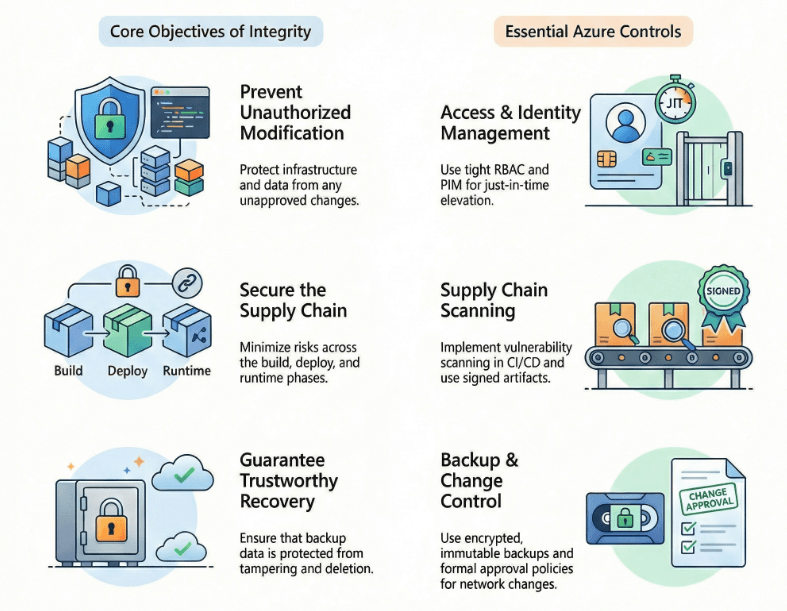
Designing for Integrity
7. Design to protect availability
Availability is not only about outages. In WAF Security, it is also about ensuring security controls stop bad actors without blocking legitimate users.
Availability in WAF Security is not only “avoid downtime.” It is “stay usable during an incident without handing control to attackers.” Security controls must block bad actors without locking out legitimate operations, especially during containment and recovery. In Azure, availability can be attacked through identity compromise, resource exhaustion, and exploitation of unpatched systems. It can also be harmed by security dependencies that are not designed for resiliency, like bottlenecked inspection paths or brittle access policies. WAF Security asks you to balance protection with continuity, and to ensure your recovery path is as secure as your primary path.
What this means in Azure
- Prevent compromised identities from gaining destructive control.
- Design for resource exhaustion attacks and abusive usage.
- Keep recovery secure: recovery resources must meet the same security bar as primary.
IaaS scenario
- DDoS attempts saturate public endpoints for a VM-based web tier.
- A compromised privileged identity deletes VMs, disables logging, or changes firewall rules.
Azure controls to use
- Privilege controls: PIM, scoped RBAC, break-glass accounts protected and monitored
- Edge protection: DDoS Protection where applicable, WAF at the edge (for web workloads), rate limiting patterns
- Patch and malware hygiene: ongoing patching processes, Defender protections where in scope
- Prioritization: focus controls on critical flows (identity, egress, data access, admin plane)
- Secure recovery: Backup/ASR plans with restricted access, logging, and parity controls in DR
Common failure mode
- DR environment is “less secure because it’s rarely used.” Attackers love your neglected environments.
WAF checkpoint
- Can I show that identity compromise is contained, resource exhaustion is mitigated, and recovery is both fast and secure?
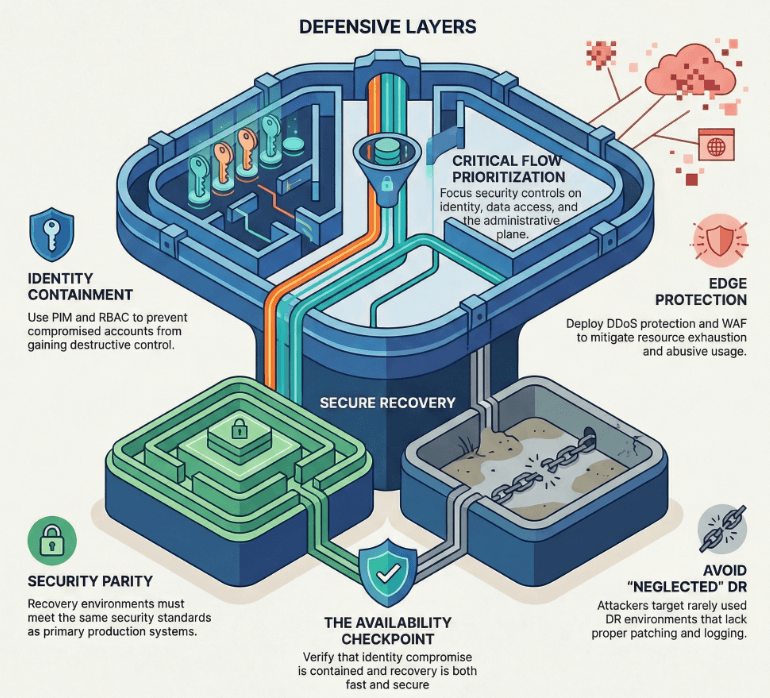
Securing Availability
8. Sustain and evolve your security posture
WAF Security is a continuous improvement loop. Your posture should not degrade over time.
Security posture decays unless you run it like an operating system. WAF Security expects a continuous improvement loop: inventory, baseline, enforcement, detection, testing, and learning. In Azure IaaS and hybrid environments, drift is constant: new resources appear, old ones stay exposed, and exceptions never expire. Attackers do not need novel techniques when environments are unmanaged over time. Sustaining posture means you can answer basic questions quickly: what do we have, who owns it, what is exposed, what changed, and what is our remediation plan. The teams that win are not the ones with the most controls. They are the ones with the best rhythm.
What this means in Azure
- Maintain an accurate, automated asset inventory.
- Threat model regularly and prioritize remediations.
- Measure posture against a baseline and enforce it.
- Test defenses and feed lessons learned back into design and operations.
IaaS scenario
- Orphaned public IPs, unmanaged NSG rules, and stale VM images become the soft underbelly of the environment.
- A new dependency introduced by an application update creates a new exploit path.
Azure controls to use
- Inventory and tagging: automate resource discovery and required tags via Azure Policy
- Posture management: Defender for Cloud recommendations, Policy compliance reporting
- Threat modeling: structured reviews tied to architecture milestones and change windows
- Testing: periodic penetration testing and continuous vulnerability scanning where appropriate
- Operations: alert routing, runbooks, incident drills, post-incident reviews
- SDL alignment: regular reviews of secure development lifecycle practices in the workload pipeline
Common failure mode
- Security is strong at launch, then drift sets in. Ownership is unclear, and exceptions pile up.
WAF checkpoint
- Do we have an operating rhythm that measures posture, enforces baseline, tests defenses, and closes the loop with action items?
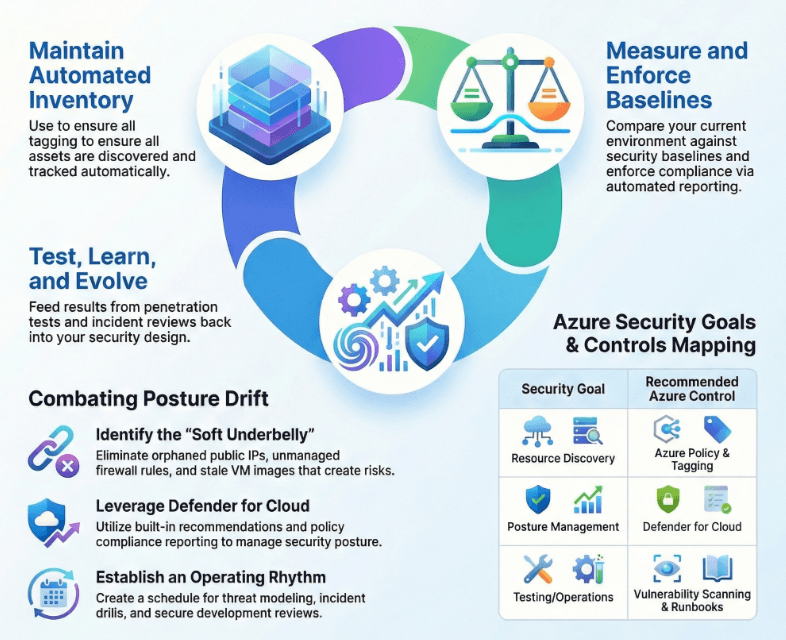
Azure Security Improvement Loop
9. Security vs reliability: tradeoffs you actually have to make
This is where many “secure designs” fall apart in production. Every meaningful security control adds something to operate: policy enforcement, identity checks, inspection paths, logging pipelines, key management, and response workflows. If you do not design those dependencies for resiliency and ownership, security will indirectly reduce reliability through complexity and fragile operational paths. WAF Security does not ask you to pick one side. It asks you to make deliberate tradeoffs, reduce friction through good design, and test the system under partial failure conditions. The goal is secure by design and reliable in practice, with runbooks that work when things are degraded.
What this means in Azure
- More controls often means more dependencies: identity checks, network hops, policy enforcement, logging pipelines.
- Each dependency needs monitoring, runbooks, and testing.
- The answer is not to remove controls. The answer is to engineer them so they fail safely and with clear response paths.
IaaS scenario
- Forced tunneling through a hub firewall improves inspection and egress control, but can become a bottleneck if not sized, monitored, and designed for resiliency.
- Tight Conditional Access policies reduce account takeover risk, but can block legitimate admins during an incident if break-glass access is not designed and tested.
Azure controls to use
- Redundancy for security dependencies: resilient hub design, HA firewall patterns, multiple zones where applicable
- Safe access paths: break-glass accounts, documented emergency elevation, tested admin access under outage conditions
- Policy strategy: enforce baseline broadly, then segment exceptions with explicit approval and expiration
Common failure mode
- Teams add a control, then never test how it behaves during partial failure (identity outage, logging delay, firewall saturation). That is where reliability problems are born.
WAF checkpoint
- For each major security dependency (identity, network inspection, logging, key management), have we designed it to be resilient, monitored, and operationally owned?
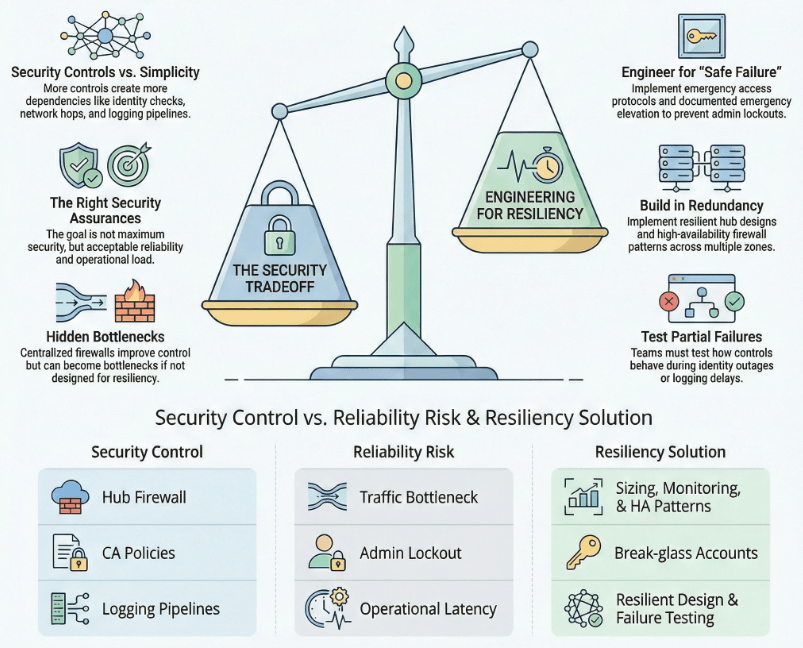
Balancing Security and System Reliability
My quick WAF Security review checklist
This checklist is how I pressure-test alignment to the Azure Well-Architected Framework Security pillar without getting lost in tooling debates. It is designed for real Azure IaaS and hybrid environments where identities, networks, and operations collide. If you can work through these items quickly with confidence, you are likely operating with real security posture. If you cannot, the checklist becomes your prioritized backlog. Either way, you walk away with clarity and next actions. Use this checklist against your most common build: hub-spoke + VM workloads + hybrid admin plane. Use the controls already mentioned, but validate they are working together, owned, and tested. Teams implement controls without a rhythm: no owners, no testing, no expiration for exceptions.
My quick WAF Security review checklist (10 bullets)
- Identity is the control plane: MFA + Conditional Access + scoped RBAC, with PIM for elevation.
- Admin plane has a controlled path: no public RDP/SSH, Bastion or jump model, full logging.
- Segmentation is real: network boundaries plus ownership boundaries.
- Egress is controlled: explicit outbound allow lists where feasible.
- Secrets are not in code or config: managed identities + Key Vault patterns.
- Data is classified and protected: encryption at rest and in transit, access logged.
- Logging is actionable: alerts have owners and runbooks, not an inbox.
- Backups are protected: restricted deletion, encryption, and recovery tested.
- Posture is measured: Policy compliance and recommendations triaged on a schedule.
- You test and learn: incident drills, vulnerability scanning, and post-incident improvements.
The Wrap Up
At the end of the day, the WAF Security pillar is not asking whether you bought enough tools or collected enough logs. It is asking whether your Azure architecture makes attacks expensive, contains blast radius by design, and gives your team a fast, repeatable path to detect, respond, and recover when something breaks. If you take one thing from this article, let it be this: pick your most critical workload, walk each component through value, boundary, detection, and recovery, then close the gaps with deliberate identity, network, data, and operational controls. That is how security becomes a built-in property of the system, not a hopeful outcome.