
Cost optimization is not “cheapest.” It is “best return.”
When people say they want to “reduce Azure costs,” what they usually mean is: “We want the same or better outcomes, with less waste.” That is a business question, not a technical one.
This is why the Azure Well-Architected Framework (WAF) matters. The Cost Optimization pillar is not a budget panic button. It is a set of design principles and habits that help you get the highest return on what you already spend.
A cost-optimized workload is not always a low-cost workload. Sometimes the “right” design costs more upfront because it avoids bigger costs later. The WAF calls out the tradeoffs clearly: security, scalability, resilience, and operability all have a cost. Ignore that, and you end up with a cheaper system that fails your business.
Cost optimization is a system, not a one-time project
Most teams start with tactical moves. Shut down some VMs. Delete a few unattached disks. Lower log retention. Those are fine, but they are reactive. They save money this month, then the bill creeps back.
WAF cost optimization is different. It pushes you toward a repeatable system: clear ownership, cost visibility, guardrails, and a regular review cadence. It is how you prevent waste instead of hunting waste.
If you want long-term financial responsibility, you need more than “find savings.” You need a strategy that keeps working as the workload grows, shrinks, and changes.
Develop cost-management discipline
This principle is about culture and accountability. Cost optimization happens at multiple levels: workload teams, platform teams, security, leadership, procurement. If nobody owns the spend, everybody accidentally creates spend.
Azure IaaS scenario: You run a 3-tier app on Azure VMs. Over time, different engineers create extra test VMs, new managed disks, and temporary public IPs. Nothing is malicious. It is just busy work. Six months later, you are paying for “temporary” resources that nobody remembers.
Here’s how I apply WAF thinking:
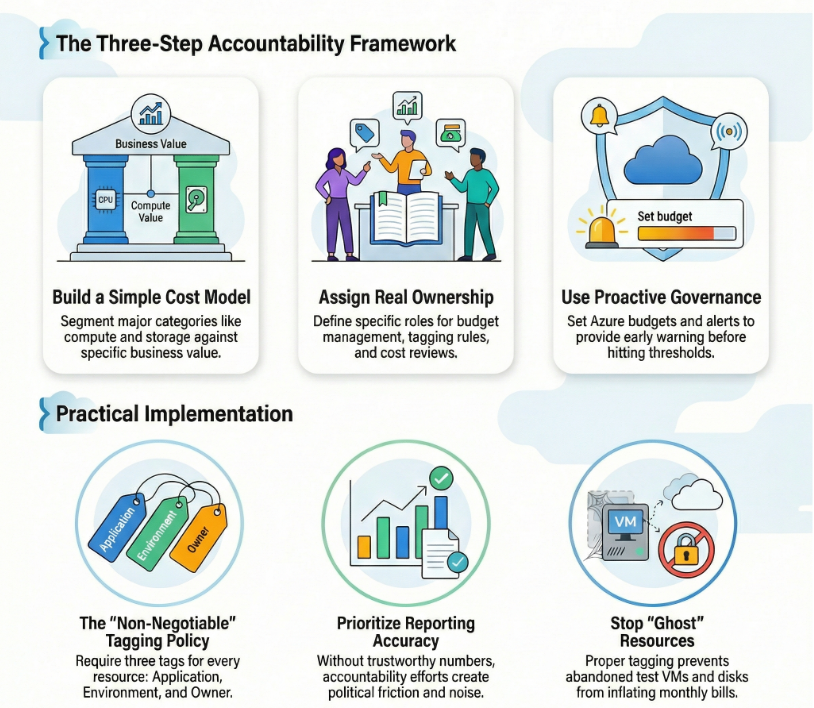
First, build a simple cost model. It does not need to be fancy. Segment the big categories: compute (VMs), storage (managed disks, snapshots), networking (public IPs, gateways), monitoring (Log Analytics), and backup. Then tie those costs to the business value the workload provides.
Second, make accountability real. Assign who owns what. Someone owns the workload budget. Someone owns tagging rules. Someone owns weekly or monthly cost review. Without defined roles, cost conversations turn into finger-pointing.
Third, use proactive governance. In Azure, this usually means budgets, alerts, and tagging. Budgets do not stop usage, but they do give you early warning when spending approaches thresholds.
Tradeoff callout: If you push accountability without good reporting, you create noise and frustration. People stop trusting the numbers. Cost optimization becomes political instead of practical.
Practical move: Put three tags on every IaaS resource: Application, Environment, and Owner. Then make it non-negotiable with Azure policy. If you cannot see who owns spend, you cannot control it.
Design with a cost-efficiency mindset
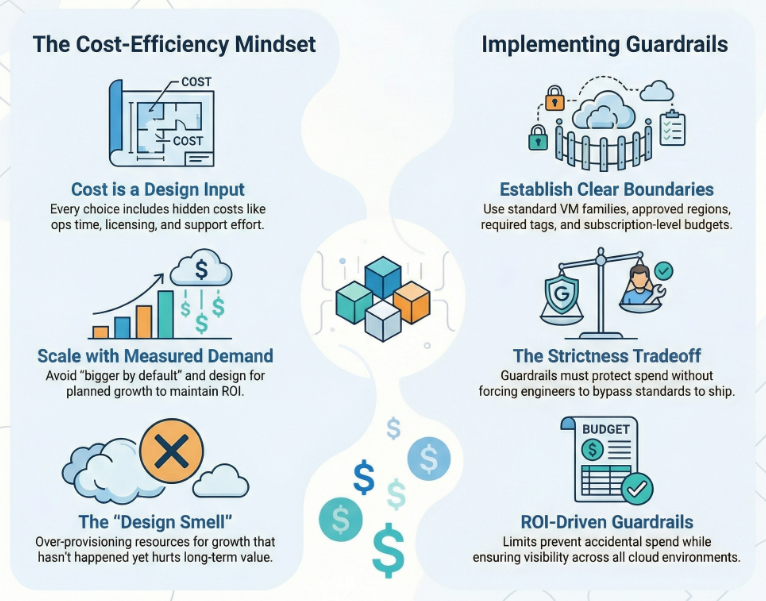
This principle is about making cost a design input, not a surprise output. Every design choice has direct costs and “hidden” costs: ops time, training, licensing, support, and the effort to run the thing.
Azure IaaS scenario: A team designs a production VM environment “just in case” growth explodes. They over-provision vCPU and memory, pick premium options everywhere, and run everything 24/7. The workload never hits that growth curve, so ROI drops.
WAF recommends you establish a cost baseline that includes projected growth, then design to that plan. You do not design beyond planned growth by default because it can hurt ROI.
In practice, this looks like guardrails. Guardrails are limits that prevent accidental or unapproved spend. In Azure, guardrails often mean:
- Standard VM families for the workload
- Approved regions for production vs non-production
- Policy rules for required tags
- Budgets scoped at subscription or resource group
Tradeoff callout: If guardrails are too strict, engineers route around them. Then you lose visibility and standards. Guardrails need to protect the business, but still let teams ship.
Practical move: Create an architecture rule that every new environment starts small and scales only with measured demand. Treat “bigger by default” as a design smell.
Design for usage optimization
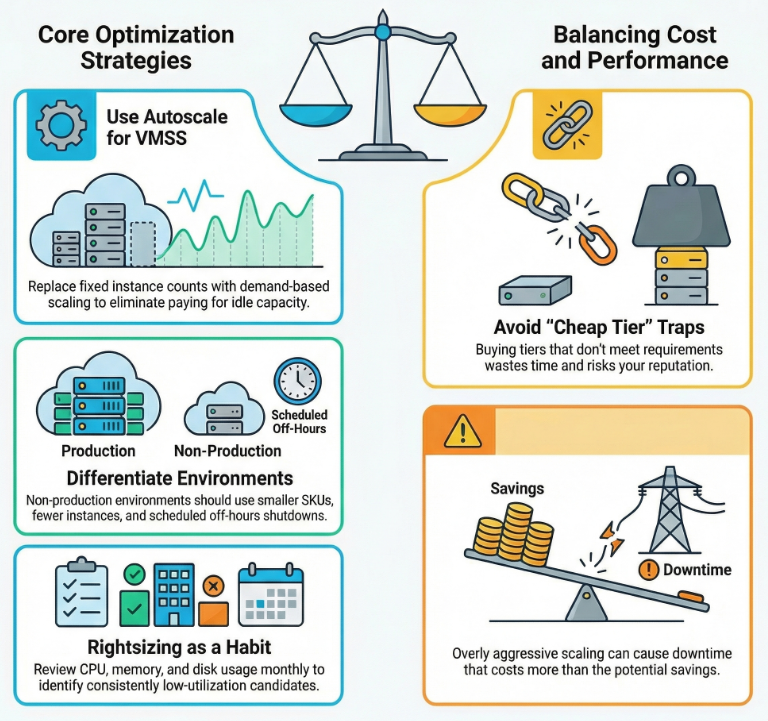
This principle is about paying for what you actually use. Azure gives you many SKUs and many tiers. If you buy capacity you do not use, you waste money. If you buy a cheap tier that cannot meet requirements, you waste time and reputation.
Azure IaaS scenario: Your web tier runs on a Virtual Machine Scale Set (VMSS), but you set a fixed instance count because “autoscale is scary.” The result is predictable: you over-provision for peak, and you pay for idle capacity the rest of the day.
Autoscale exists for a reason. VMSS autoscale can add and remove instances based on demand signals, so you do not have to pre-provision everything. The goal is not to run at the smallest possible size. The goal is to run at the right size for the current load.
Another common usage issue is environment sprawl. Not every SDLC environment needs to look like production. WAF explicitly calls out treating non-production environments differently. Non-prod can have fewer instances, smaller SKUs, less logging, and off-hours shutdown schedules.
Tradeoff callout: If you scale down too aggressively, you create performance problems and downtime. That can cost more than the savings. Usage optimization must respect performance and reliability targets.
Practical move: Make “right-sizing” a monthly habit. Look at CPU, memory, and disk behavior over time. If a VM is consistently low utilization and stable, it is a right-sizing candidate.
Design for rate optimization
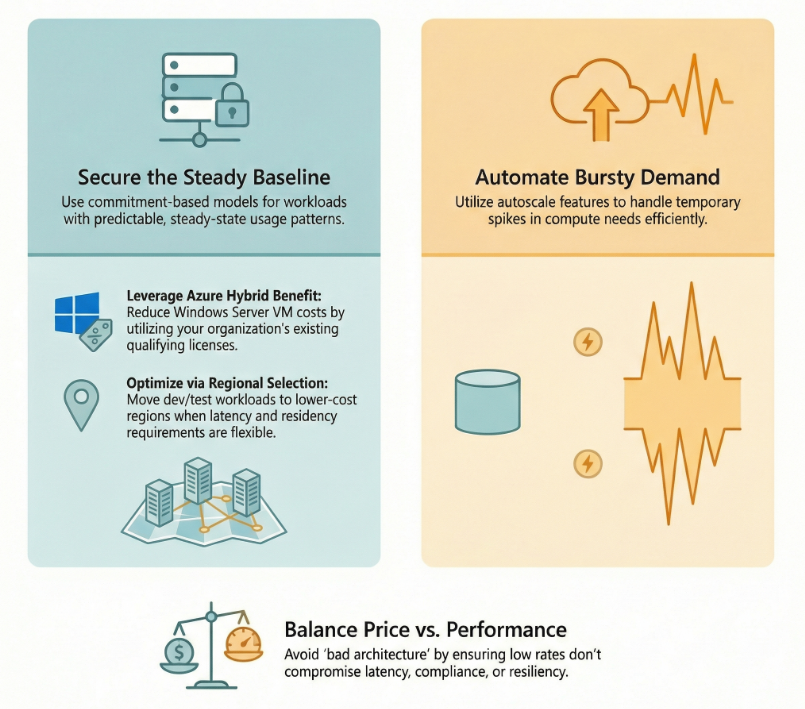
This principle is about reducing the price you pay for the same usage. You are not changing what the workload needs. You are changing how you buy it.
Azure IaaS scenario: You have a baseline of VMs that are always on. They support core business workloads. The usage pattern is steady and predictable.
For predictable compute, Azure offers commitment-based options like Reservations and savings plans. These are designed to reduce costs when you can commit to usage over time. The details matter, but the core idea is simple: if you know you will keep paying for compute, explore discounted purchase models.
Also, do not ignore licensing opportunities. If your organization has qualifying Windows Server licenses, Azure Hybrid Benefit can reduce the cost of running Windows Server VMs in Azure.
Rate optimization also includes region and density decisions. If production needs a specific region for latency, compliance, or availability, that is fine. But non-production often has more flexibility. Using lower-cost regions for dev and test can free budget for higher-value work.
Tradeoff callout: Chasing the lowest rate can cause bad architecture. For example, moving regions without considering data residency, latency, or resiliency can create expensive problems.
Practical move: Split your compute into two buckets: steady baseline vs bursty demand. Use autoscale for burst. Use commitment-based discounts for baseline where it makes sense.
Monitor and optimize over time
This is the part most teams skip. They do a cost project once, then move on. But workloads change. Platform features change. Agreements change. What was “right-sized” last year might be oversized today.
Azure IaaS scenario: Your monitoring settings were set during an incident. Now you ingest a huge volume of logs forever. Nobody revisits it. The bill grows quietly.
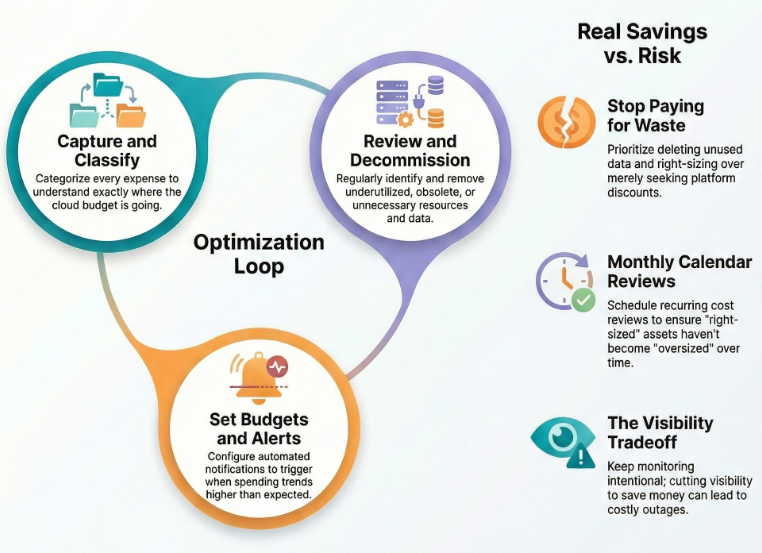
WAF pushes a continuous loop: capture and classify expense, set alerts, review regularly, and decommission waste. In Azure, that often means:
- Budgets and alerts that notify when spend is trending high
- Regular review of cost reports and recommendations
- Removal of underutilized or obsolete resources
- Cleanup of unnecessary data and retention settings
Decommissioning is real savings. Right-sizing is savings. Removing unused resources is savings. Deleting data you do not need is savings. Cost optimization is not only “buy discounts.” It is also “stop paying for stuff you do not use.”
Tradeoff callout: If you cut cost by reducing visibility, you will pay for it later in outages and longer incident response. Monitoring should be intentional, not unlimited.
Practical move: Put cost review on the calendar. Monthly for most workloads. More often for fast-changing workloads. Tie every cost action back to a business reason.
Mini case study: a real Azure IaaS workload
Let’s use a common pattern: a 3-tier internal business app.
- Web tier: VM Scale Set behind Application Gateway or Azure Load Balancer
- App tier: a small set of VMs
- Data tier: SQL Server on an Azure VM (plus backups)
- Monitoring: Azure Monitor and Log Analytics
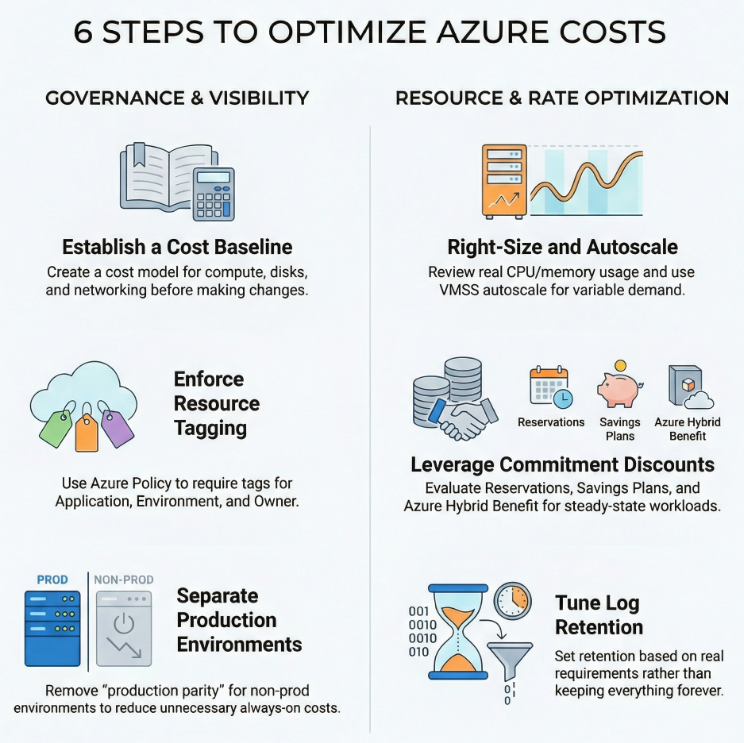
Here are seven cost decisions where WAF cost optimization changes the outcome.
1) Start with a cost model. Before tuning anything, we estimate the run rate: compute, disks, backups, logs, and network. This sets the baseline and makes future changes measurable.
2) Tag everything and enforce it. We require tags for Application, Environment, and Owner. We use policy so new resources are not created without cost identity. This improves cost reporting and accountability.
3) Separate production from non-production on purpose. Production stays stable. Non-prod is smaller and has fewer always-on requirements. We remove “production parity by default” unless there is a specific testing reason.
4) Use autoscale where demand is variable. The web tier uses VMSS autoscale to avoid paying for peak capacity 24/7. We set minimum and maximum bounds so cost stays controlled.
5) Right-size based on real usage. We review CPU, memory, and disk patterns. We right-size the app tier VMs if they were picked during a launch rush and never revisited.
6) Optimize rates for the steady baseline. If the app tier and data tier run 24/7, we evaluate commitment-based discounts like Reservations or savings plans for that baseline. If the workload runs Windows Server and the org has qualifying licenses, we evaluate Azure Hybrid Benefit.
7) Tune logging and retention with intent. We keep the logs needed for security and operations, but we set retention based on real requirements. We avoid “keep everything forever” unless compliance requires it.
When you apply WAF cost optimization like this, the bill becomes predictable. More important, the bill matches business value. That is the goal.
The Wrap Up
If you want a practical next step, use the Azure Well-Architected Framework Cost Optimization checklist https://learn.microsoft.com/en-us/azure/well-architected/cost-optimization/checklist . It is designed as a design review tool, but it is just as useful as an operating system for ongoing cost hygiene.
Cost optimization is not a one-time cleanup. It is a set of repeatable decisions and habits. Build discipline. Design for efficiency. Optimize usage. Optimize rates. Monitor and improve.